Link to Windows




Click to download now, finish the installation quickly, and directly unlock the "all-round experience"
About This App
🏆 Expert Verdict & Overview
Link to Windows represents a cornerstone app in the modern Productivity landscape, designed to dismantle the barrier between Android smartphones and Windows PCs. It moves beyond simple connectivity, aiming to create a fluid, integrated workflow ecosystem. As a strategic extension of Microsoft's ecosystem, it directly targets the user pain point of context-switching between devices, promising a unified experience that leverages the strengths of each platform.
🔍 Key Features Breakdown
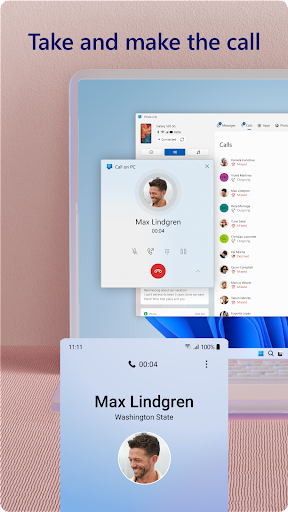
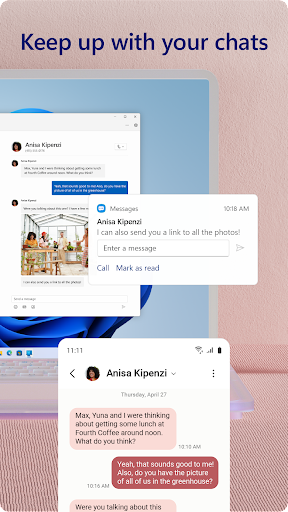
- Unified Communication Hub: Directly addresses fragmented messaging by allowing users to send/receive SMS and make/receive calls from their PC desktop. This solves the problem of constantly checking and switching to your phone for basic communication, keeping you focused on a single screen.
- Seamless File & Content Transfer: Eliminates the clunky process of emailing files to oneself or using cloud storage as a middleman. The ability to drag-and-drop or copy-paste files and text between devices solves the friction in moving content, turning two devices into a single, cohesive workstation.
- Cross-Device Notifications & App Mirroring: Solves notification overload and distraction by funneling phone alerts to the PC. Furthermore, mirroring select mobile apps to the larger PC screen allows users to interact with mobile-only content using superior PC peripherals, addressing the limitation of small touchscreens for certain tasks.
- Integrated Photo Library Access: Specifically targets the common user problem of wanting to edit or use a phone photo on a PC. Instant access to the phone's camera roll without manual transfer streamlines content creation and sharing workflows.
🎨 User Experience & Design
The UI within the Phone Link desktop application adheres to Microsoft's Fluent Design System, promoting familiarity for Windows users. The UX prioritizes clear, tile-based access to core functions (Messages, Photos, Apps). For a Productivity tool, the critical metric is efficiency—setting up the initial link is straightforward, and core actions like replying to a text or dragging a file require minimal clicks. However, the UX quality bifurcates based on hardware; the experience on deeply integrated Samsung/Duo devices feels native and fluid, while on other Android phones, it can feel more like a capable but distinct companion app.
⚖️ Pros & Cons Analysis
- ✅ The Good: Dramatically reduces device-switching friction for core tasks like messaging and file transfer.
- ✅ The Good: The tight integration with select OEMs (Samsung, Surface Duo) offers a glimpse of a truly unified OS experience.
- ✅ The Good: Functionality leverages the PC's hardware (keyboard, mouse, large screen) to enhance interactions with mobile content.
- ❌ The Bad: A tiered feature set creates a fragmented user experience; advanced features like app mirroring and drag-and-drop are locked to specific phone brands.
- ❌ The Bad: Requires specific hardware (Bluetooth, recent Windows/Android versions) and software configurations, which can be a barrier for some users.
- ❌ The Bad: The core app mirroring ("Phone screen") can sometimes exhibit latency, breaking the illusion of seamless integration during intensive use.
🛠️ Room for Improvement
To evolve from a great connectivity tool to an indispensable platform bridge, the next update should prioritize feature parity. Bringing full app mirroring and drag-and-drop to all compatible Android devices, not just select partners, is crucial. Improving the stability and latency of the mirrored phone screen is essential for professional use cases. Furthermore, adding support for syncing clipboard history (beyond the last item) and providing more granular control over which app notifications are mirrored would give power users finer control over their unified workflow.
🏁 Final Conclusion & Recommendation
Link to Windows is a highly recommended productivity essential for any user deeply invested in the Android and Windows ecosystem, particularly those with supported Samsung or Surface Duo devices who will get the most complete experience. It is tailor-made for professionals, students, or power users who need to seamlessly blend communication and content between their primary computer and mobile device. For users outside the supported hardware list, it remains a useful tool for basic SMS and notification management, but the full transformative potential is yet to be unlocked. Ultimately, it successfully turns two separate devices into a more powerful, connected whole.
Best Similar Apps